Copyright 2012 - Sefendi Blog. Powered by Blogger.
Showing posts with label POS Printer. Show all posts

Download Driver For Epson TM-U950 Reciept Printer

Written By Sefendi on Wednesday, October 26, 2011 | 3:05 AM


Epson TM-U950 Reciept Printer Specification

General

Printer Type : POS receipt printer - Dot-matrix - 9 pin - Monochrome
Width : 9.9 in
Depth : 11.7 in
Height : 7.7 in
Weight : 12.3 lbs

Printer

Print Speed : up to 311 char/sec - Max speed, up to 233 char/sec - Normal
Connectivity Technology : Wired
Interface : Serial
Max Resolution ( B&W ) : 16.7 cpi
Language Simulation : EPSON ESC/POS

RAM

RAM Installed ( Max ) : 2 KB

Media Handling

Media Type : Continuous forms, Plain paper
Max Media Size (Custom) : 8.25 in x 11.7 in
Media Sizes : A4 (8.25 in x 11.7 in), Roll  (2.75 in)
Media Feeder(s) : 1 x Manual load - 1 sheets - A4 (8.25 in x 11.7 in), 1 x Manual load - 1 rolls - Roll (2.75 in)
Max Sheets in Multi-Part Form : 5

Expansion / Connectivity

Expansion Bays : None
Expansion Slot(s) : None
Connections : Serial - RS-232C

Miscellaneous

MTBF : 180,000 hour(s)
Compliant Standards : VCCI, FCC Class A certified, UL, CSA, CE

Software / System Requirements

Software Included Drivers & Utilities

Environmental Parameters

Min Operating Temperature : 41 °F
Max Operating Temperature : 104 °F
Humidity Range Operating : 30 - 80%

Download driver for Epson TM-U950-Reciept Printer : APD_407EWM.exe
3:05 AM | 0 comments | Read More

Epson TM-U295 Receipt Printer Specification

Written By Sefendi on Friday, October 21, 2011 | 8:32 PM


Epson TM-U295 Receipt Printer Specification

General

Printer Type : POS receipt printer - Dot-matrix - 7 pin - Monochrome
Width : 7.1 in
Depth : 7.5 in
Height : 4 in
Weight : 3.5 lbs
Enclosure Color : Cool white

Printer

Print Speed : up to 2.1 lines/sec - B/W
Connectivity Technology : Wired
Interface : Serial
Max Resolution ( B&W ) : 16.2 cpi

Media Handling

Media Type : Labels , Plain paper
Max Media Size (Custom) : 7.17 in x 10.12 in
Media Feeder(s) : 1 x Manual load - 1 sheets - JIS B5 (7.17 in x 10.12 in)

Expansion / Connectivity

Expansion Bays : None
Expansion Slot(s) : None
Connections : 1 x Serial - RS-232C

Miscellaneous

Compliant Standards : CSA 22.2 No. 950, VCCI Class A ITE, FCC Class A certified, UL, CE

Software / System Requirements

Software Included : Drivers And Utilities

To get the Software Download Advanced Printer Driver, you can download at this link : Advanced Printer Driver Epson TM-U295
8:32 PM | 0 comments | Read More

Epson TM U230 Specification And Driver Download

Written By Sefendi on Wednesday, October 19, 2011 | 1:35 AM


Epson TM U230 Specification

General
Printer Type : POS receipt printer - Dot-matrix - 9 pin - Color
Width : 6.5 in
Depth : 6.6 in
Height : 10.2 in
Weight : 6 lbs

Printer
Print Speed : up to 6.4 lines/sec - B/W, up to 6.4 lines/sec - Color
Connectivity Technology : Wired
Interface : Serial
Max Resolution ( B&W ) : 16 cpi
Max Resolution ( Color ) : 16 cpi

Media Handling
Max Media Size : (Custom) 3 in
Media Sizes : Roll (3 in)
Total Media Capacity : 1 rolls
Media Feeder(s) : 1 x Manual load - 1 rolls - Roll (3 in)
Max Sheets in Multi-Part Form : 2

Telecom
Modem : None

Networking
Networking : None

Expansion / Connectivity
Expansion Bays : None
Connections : 1 x Serial

Miscellaneous
Included Accessories : Cutter
MTBF : 180,000 hour(s)
Compliant Standards : VCCI Class A ITE,FCC Class A certified,UL,TUV,CSA,CE

Power
Power Device : Power adapter - External
Power Consumption Operational : 38 Watt
Power Consumption Stand by / Sleep : 3 Watt

Software / System Requirements
OS Required : Microsoft Windows 2000

To get the Advanced Printer Driver, you can download at this link : Advanced Printer Driver.
This driver is version 4, support OS : Windows XP,  Windows 7, Windows Vista, Server 2003, Server 2008.
1:35 AM | 0 comments | Read More

How To Install The Advanced Printer Driver (APD) for EPSON TM/EU/BA Printers

Written By Sefendi on Friday, July 29, 2011 | 10:07 PM

To get the Advanced Printer Driver, you can download at this link : Advanced Printer Driver.
This driver is version 4, support OS :
  • Windows XP Professional SP3 Home Edition (32bit)
  •  Windows Vista Business / Ultimate / Enterprise SP1 Home Edition (32bit)
  •  Windows XP Embedded SP2
Support Models List : TM-H5000II, TM-H6000II, TM-H6000III, TM-J7000/J7100, TM-J7500/J7600, TM-C100, TM-T70, TM-T88III, TM-T88IV, TM-T90, TM-P60, TM-P60, TM-L60II, TM-L90, TM-L90 Peeler, TM-U120, TM-U220A, TM-U220B, TM-U220D, TM-U230, TM-U375, TM-U675, TM-U950, TM-U295, TM-U590, DM-D110, DM-D120, DM-D210, DM-D500, EU-T300, EU-T400, EU-T500, BA-T500.

Installation :
  1. Double click the [APD] icon and start the installation.
  2. The Install ShieldWizard screen appears. Click the [Next] button.
  3. The “License Agreement” screen appears. Read the content and select "I accept the terms of the license agreement". Then click the [Next] button.
  4. The “Setup Type” screen appears. Select "Standard", then click the [Next] button.
  5. The “Printer Configuration” screen appears. When installing the printer driver as well as the APD, click the [Add] button. When you want to install the printer driver later, click the [Next] button and proceed to Step 11.
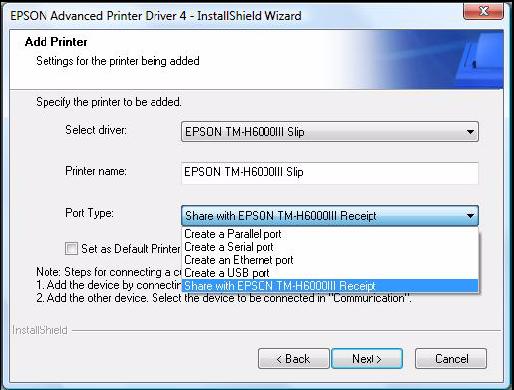
  6. The “Add Printer” screen appears. Configure the printer driver and port to use, and click the [Next] button.
  7. The “Parallel Port Settings” screen appears. Configure the settings of the Parallel port and click the [Next] button. Proceed to Step 10.
  8. The “Serial Port Settings” screen appears. Configure the settings of the Serial port and click the [Next] button. Proceed to Step 10.
  9. The “Ethernet Settings” screen appears. Configure the IP Address of the TM printer and click the [Next] button. Proceed to Step 10.
  10. The display returns to the “Printer Configuration” screen. All the printer drivers, configured between Step 6 to Step 9, appear in the list. To install multiple printer drivers, repeat Step 5 to Step 9. To install the same printer driver multiple times, click the [Copy] button.
    For the following installation combinations, select the setting of the first printer driver for the “Port Type” of the “Add Printer” screen at Step 6 when you install the second or later printer drivers (example: “Share with EPSON TM-H6000III Receipt”). • Using both the Receipt driver and Slip driver for a hybrid printer. • Using peeler paper on one label printer and using full-label paper on another label printer. • Making multiple different print settings on multiple printer drivers (Example: using two drivers, specify portrait receipt printing on one driver and specify landscape receipt printing on another driver).
    When the settings of the printer drivers are finished, click the [Next] button.
  11. The “Start Copying Files” screen appears. See "Current Settings" to confirm the installation settings and then click the [Next] button.
  12. The “InstallShield Wizard Complete” screen appears. Click the [Finish] button to finish installation.
10:07 PM | 0 comments | Read More

How To Easily Detect Connection Interface Port Printer TM-U 220

Written By Sefendi on Tuesday, July 19, 2011 | 2:01 AM

Epson TM-U220 POS Receipt Printer

TM-U 220 POS Receipt Printer has two interfaces : Serial port and Parellel port. How do I detect both interfaces if there are problems with computer connections?.
To test the connection interface port on the printer TM-U 220 can be done by using commands in the dos command prompt. The commands used are : dir >prn.

Following steps :

Step 1
Turn on the printer and make sure the printer and computer connection cables are plugged in correctly.

Step 2
Start - Programs - Accessories - Command Prompt.

Step 3
Type the command : dir >prn

Note : We could be in the directory computer anywhere.

Step 4
Printer TM-U 220 will make a printout of the above command. Files that are printed directories at our command.

Note :
  • If the printer to print out, then the connection interface on the printer no problem.
  • If the printer does not respond, then the connection interface on the printer problem.
  • We perform this step can be done without installing the printer driver.
  • Command on the dos command prompt can be applied on the other dot matrix printers.
2:01 AM | 0 comments | Read More

How to Perform a Self-Test on TM-U220 POS Receipt Printer

Written By Sefendi on Friday, July 15, 2011 | 9:44 PM


TM-U220 POS Receipt Printer Self Test Procedure :
  1. Make sure the printer is turned off and the roll paper cover is closed properly.
  2. While holding down the FEED button, turn on the printer using the switch on the front of the printer. The self test prints the printer settings and then prints the following, cuts the paper, and pauses. (The PAPER OUT light blinks.) If you want to continue SELF-TEST printing, Please press the FEED button.
  3. Press the FEED button to continue printing. The printer prints a pattern using the built-in character set.
  4. The self test automatically ends and cuts the paper after printing the following :
    * completed *
    The printer is ready to receive data as soon as it completes the self test.
Note :
If you want to pause the self test manually, press the FEED button. Press the FEED button again to continue the self test.
9:44 PM | 0 comments | Read More

EPSON TMU220B-867

Written By Sefendi on Tuesday, July 12, 2011 | 1:38 AM

EPSON TMU220B-867

Description :
The TM-U200 is an ideal low cost printer for point-of-sale applications. The modular user-friendly design, graphics capability, and 3.5 lines per second print speed offer reliable high performance in a compact, lightweight design. The TM-U200 features modular interface boards that enable users to select from bi-directional parallel, RS-232C, RS-422, RS-485, ethernet and USB interfaces simply by ordering a new module. Other features include a paper end detector that automatically alerts the user when the printer is out of paper, an auto cutter and take up, and the ability to print one original plus two copies.

Specifications :
Output Type : Color Printer
Printer Technology : Dot Matrix Printer
Recommended Use : Receipt Print
Depth : 9.76"
Class : Printer
Height : 5.45"
Printer Type : Dot Matrix Printer
Black And White Vertical Resolution : 16 cpi
Black And White Print Speed : 3.5 lps
Manufacturer Sku : TMU200B111
Weight : 4.85 lbs
Description : Point of Sale Products Station Printers TM-U200 B111 Dot Matrix 13x16cpi 3lps
Manufacturer Description : TM-U200
Width : 6.30"
Category : Dot Matrix
Black And White Horizontal Resolution : 13.3 cpi
Connectors : Ethernet - RJ45 Twisted-Pair (XBaseT),Parallel - 36 pin Centronics (IEEE 1284B),Serial - 25 pin D
Product Line Series Model : Station Printers TM-U200 B111
Standard Memory : 4 KB
Product Type : Dot Matrix Printer
Features : Cutter
Maximum Mono Print Speed : 0 lpm
Number Of Pins : 9-pin
Color : Gray
Brand Name : Epson
Dimensions : 5.45" Height x 6.30" Width x 9.76" Depth
Product Model : TM-U220B
Package Contents : TM-U220B Receipt Printer Ribbon: ERC-38
Number Of Columns : 42
Input Voltage : 24 V DC
Serial : Yes
1:38 AM | 0 comments | Read More

Epson TM-U220B 2 Color DOT Matrix Printer - Dark Gray

Epson TM-U220B 2 Color DOT Matrix Printer - Dark Gray
Description :
Epson's TM-U220B POS Impact Printer is a compact, reliable and optimized solution for high-speed throughput. It offers easy-to-use features important to the retail, restaurant and hospitality industries. The TM-U220B features two-color printing to highlight special offers, kitchen orders and impactful logos. In addition, it is equipped with an adjustable paper width feature which allows you to use 58, 70 or 76mm paper rolls for a greater flexibility and cost savings. Furthermore, it comes with an auto-cutter so you can choose between a full or partial cut and features an auto status back function that automatically transmits changes in the printer status. Designed to provide a wall-mounting option, the TM-U220B is an ideal choice for your professional printing needs.

Specifications :
Output Type : Monochrome Printer, Color Printer
Printer Technology : Dot Matrix Printer
Recommended Use : Receipt Print
Printer Memory : 100 MB
Standard Memory : 4 KB
Product Type : Dot Matrix Printer
Height : 5.45"
Maximum Mono Print Speed : 0 lpm
Green Compliance : Yes
Number Of Pins : 9-pin
Depth : 9.76"
Print Color : Monochrome
Brand Name : Epson
Dimensions : 5.45" Height x 6.30" Width x 9.76" Depth
Ethernet Technology : Fast Ethernet
Width : 6.30"
Number Of Columns : 42
Input Voltage : 24 V DC
Ethernet : Yes
Product Series : TM
Platform Support : PC
1:21 AM | 0 comments | Read More

Epson TM-U220B Serial 2 Color DOT Matrix Receipt Printer

Epson TM-U220B Serial 2 Color DOT Matrix Receipt Printer
Description :
Interface: Serial * Serial Color : Dark Gray (Click Picture for Larger Image) Includes Power Supply and Cables Receipt Printer Type: Impact / Dot Matrix Receipt Printer Other: Auto-Cutter (Guillotine Type) and Metal Tear Bar**NEW, DROP IN PAPER LOADING**

Specifications :
Output Type : Monochrome Printer, Color Printer
Printer Technology : Dot Matrix Printer
Recommended Use : Receipt Print
Standard Memory : 4 KB
Product Type : Dot Matrix Printer
Height : 5.45"
Media Size : Custom Size
Maximum Mono Print Speed : 0 lpm
Green Compliance : Yes
Number Of Pins : 9-pin
Depth : 9.76"
Print Color : Monochrome
Brand Name : Epson
Dimensions : 5.45" Height x 6.30" Width x 9.76" Depth
Product Model : TM-U220B
Width : 6.30"
Number Of Columns : 42
Input Voltage : 24 V DC
Serial : Yes
Platform Support : PC
1:01 AM | 0 comments | Read More

Epson TM-U220D POS Receipt Printer

Epson TM-U220D POS Receipt Printer
DESCRIPTION :
Epson's TM-U220PD printer is compact, reliable and optimized for high-speed throughput. They offer all the easy-to-use features important to the retail, restaurant and hospitality industries and two-color printing to highlight special offers, kitchen orders and impactful logos. In addition, the TM-U220PD printers have been designed to be 100% compatible with existing systems that currently use a TM-U200 printer.

SPECIFICATIONS :
Output Type : Monochrome Printer, Color Printer
Printer Technology : Dot Matrix Printer
Recommended Use : Receipt Print
Standard Memory : 4 KB
Product Type : Dot Matrix Printer
Height : 5.45"
Parallel : Yes
Media Size : Custom Size
Maximum Mono Print Speed : 0 lpm
Green Compliance : Yes
Number Of Pins : 9-pin
Depth : 9.76"
Print Color : Monochrome
Brand Name : Epson
Dimensions : 5.45" Height x 6.30" Width x 9.76" Depth
Product Model : TM-U220D
Width : 6.30"
Number Of Columns : 42
Platform Support : PC

12:36 AM | 0 comments | Read More